Updated Oct 19
InfinitePIPProductivity · Display
Keep any screen, window or region in view, always on top.
$4.99WindowsmacOSLinux
Add a monitor that isn't there.
Skip to get Linux Virtual Display DriverReal capture · github.com · Sept 2026 The whole project is Python and shell script. No kernel code, nothing to compile.
Linux Virtual Display Driver adds virtual monitors to Linux desktops running X11. It is a small native GTK3 app, written in Python, that finds an output your graphics driver exposes but isn't using and switches it on at the resolution and refresh rate you choose, so VR apps, OBS, Sunshine and screen-sharing tools see one more monitor.
It works through xrandr with its own VESA CVT modeline code, so there is no kernel module to build. AMD and Intel GPUs work straight away; NVIDIA needs a guided one-time setup that writes a small Xorg config and a virtual EDID, followed by a fresh login. Each display can sit left, right, above or below an existing screen or mirror it, and your displays are remembered between sessions.
Version 1.0.0 runs straight from source or installs system-wide with the included script, which supports apt, pacman, dnf and zypper. It is free under GPLv3 for personal and non-commercial use; commercial use needs a separate licence.
No. It needs an X11 (Xorg) session because every step goes through xrandr.
NVIDIA's proprietary driver won't add modes to disconnected outputs while X is running, so the app writes /etc/X11/xorg.conf.d/99-linux-vdd.conf and a virtual EDID; log out and back in once, then new displays appear instantly.
On NVIDIA run the Setup Virtual Outputs flow; on Intel look for VIRTUAL1/VIRTUAL2; on any GPU you can install xf86-video-dummy or load the evdi kernel module.
Yes for personal, educational and non-commercial use under GPLv3. Commercial use needs a separate licence from VirtualDrivers.
Use Menu > Remove NVIDIA Config (then restart your session) if you ran the NVIDIA setup, and sudo ./uninstall.sh for a system-wide install. The uninstaller keeps your saved displays in ~/.config/linux-vdd/ until you delete that folder.
Python 3.10 or newer. The README still lists 3.8+, but the current code does not run on 3.8 or 3.9.
On systems with GDM the app writes the login screen's monitors.xml so the greeter stays on your physical display. Other display managers are not changed.
Keep any screen, window or region in view, always on top.
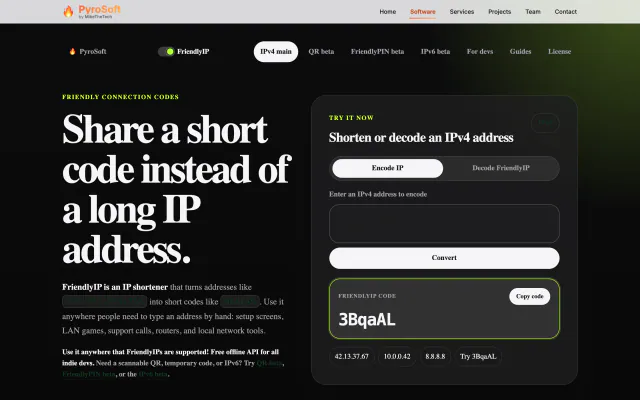

Turn IPv4 addresses into six-character codes you can read aloud.