Coming soon macOS 14+ · Apple Silicon

Virtual devices for the Mac

Build a bigger Mac.

Virtual Drivers for macOS is a native SwiftUI control center for virtual devices. Spawn displays, audio cables, cameras, MIDI ports, network interfaces and disk-image volumes — multiple instances of each — then configure, test and stop them from one app.

6 device modules Native SwiftUI Developer ID notarized No SIP changes
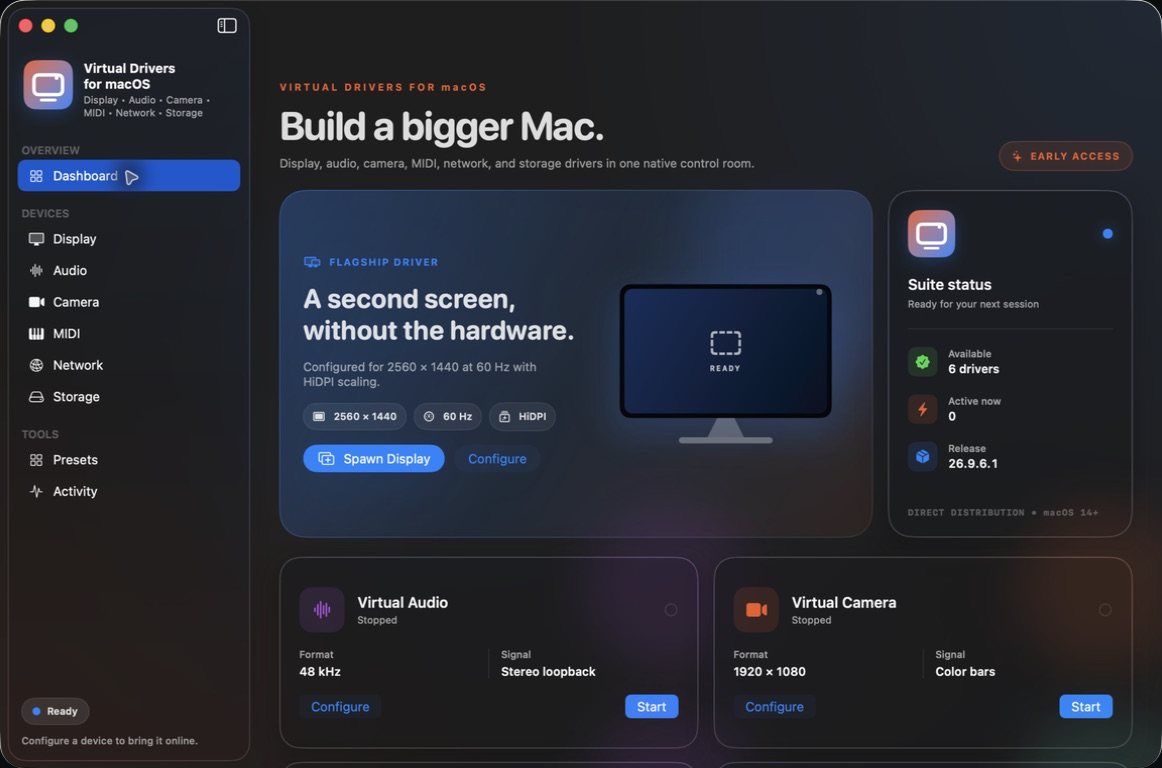
Virtual Drivers for macOS dashboard: a sidebar listing Display, Audio, Camera, MIDI, Network and Storage, a flagship virtual display card set to 2560 × 1440 at 60 Hz with HiDPI, and a suite status panel showing 6 drivers available on release 26.9.6.1
Real capture · build 26.9.6.1 The dashboard: every device module in one sidebar, and the flagship virtual display ready to spawn.

Module by module

Six modules working. One waiting on Apple.

Each device type gets its own workspace, and every available module can create and stop multiple independent instances. Status below is for build 26.9.6.1, tested in September 2026 — none of it is downloadable yet.

01 · DisplayWorking
Session-scoped virtual displays with their own name and hardware identity.

640 × 480 up to 7680 × 4320, 24–240 Hz, 72–360 PPI, HiDPI, and placement left, right, above or below. Four presets to start from.

02 · AudioWorking
Up to eight stereo loopback cables, plus a live mixer.

Core Audio HAL drivers at 44.1 or 48 kHz, 32-bit float. Route microphones and cable returns into speakers, interfaces or other cables.

03 · CameraWorking
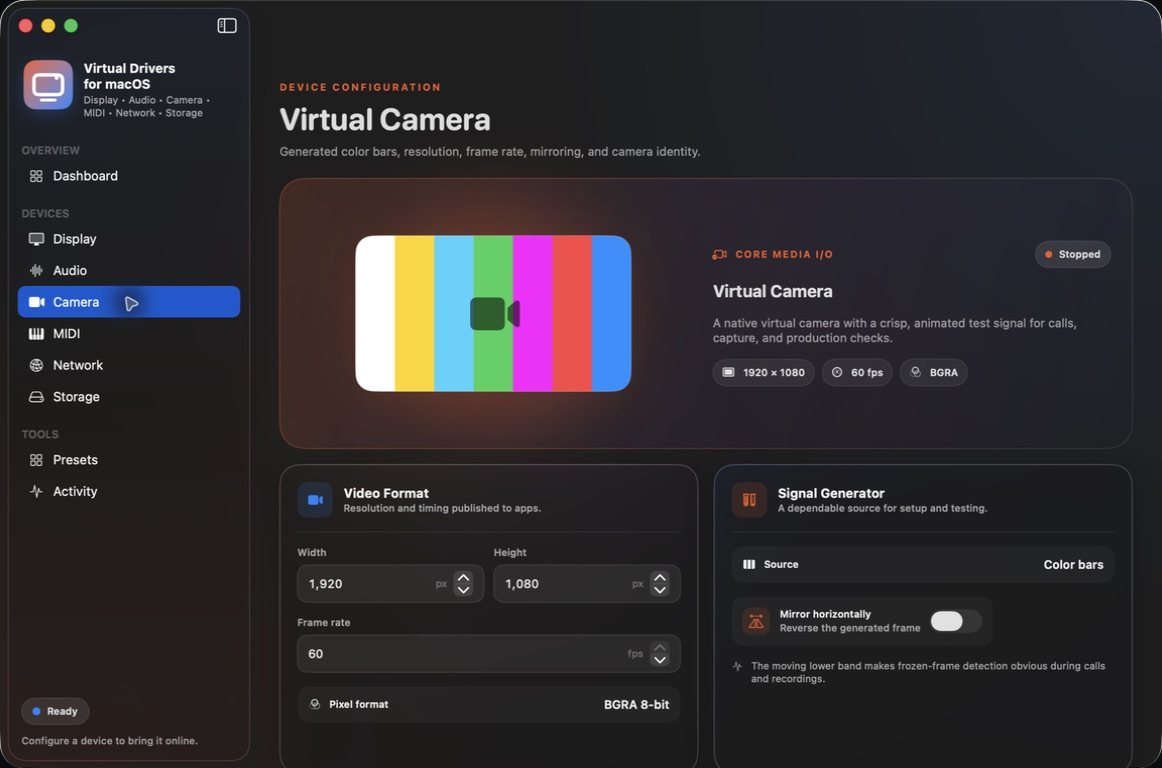
A Core Media I/O camera that apps like QuickTime can select.

320 × 240 up to 3840 × 2160 at 1–60 fps, with mirroring. The source is generated color bars — a test signal, not a webcam or screen feed.

04 · MIDIWorking
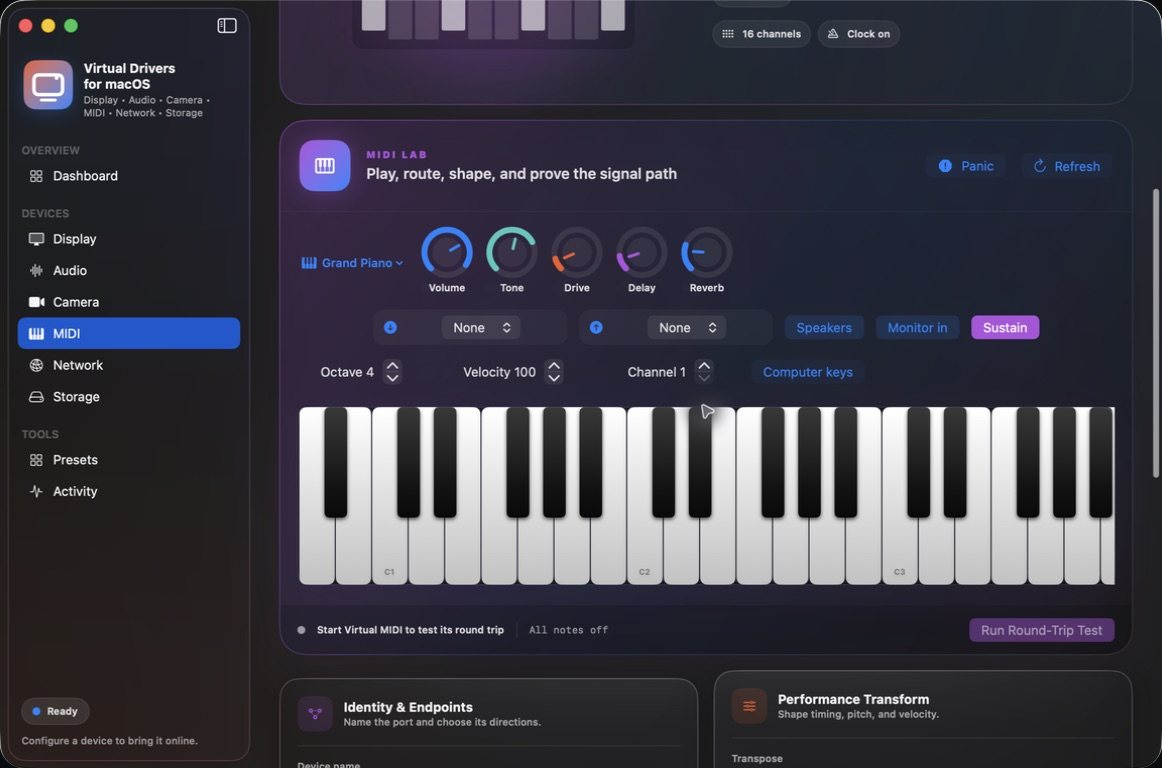
CoreMIDI sources and destinations, and a playable MIDI Lab.

MIDI 1.0 with channel filtering, transpose, velocity scaling, latency, clock, MTC and SysEx forwarding. MIDI 2.0 isn't implemented.

05 · NetworkWorking
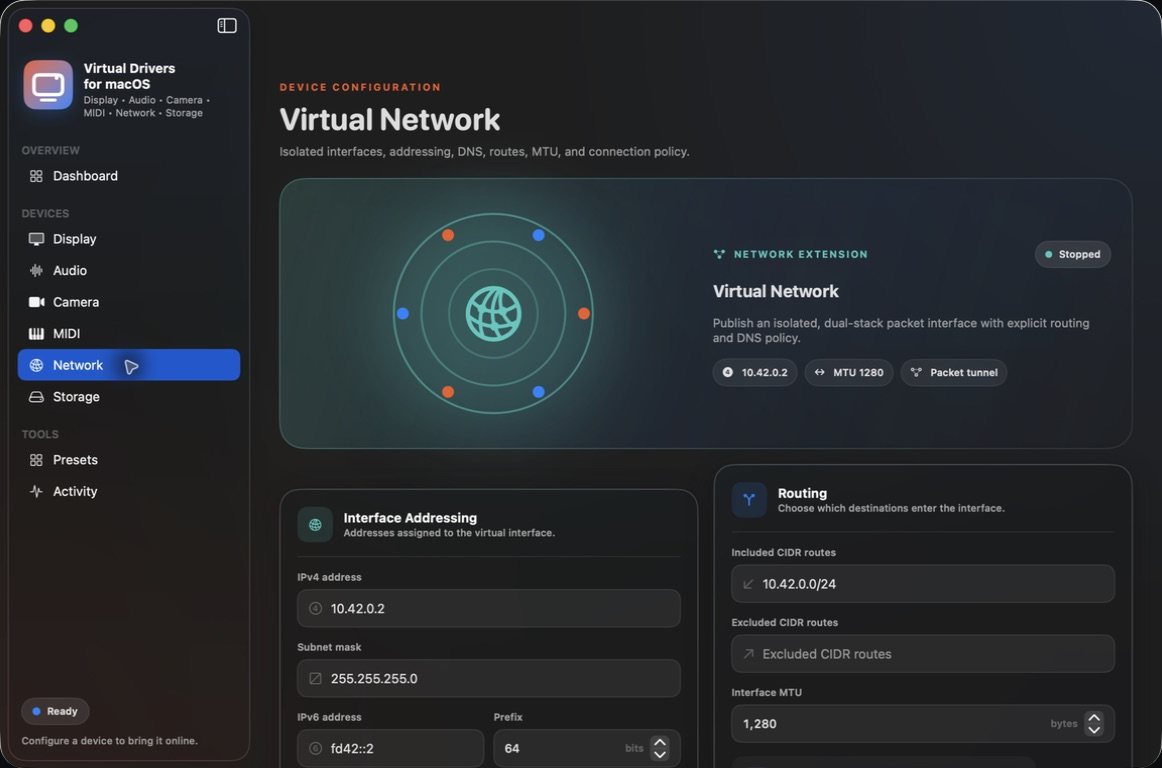
An isolated dual-stack packet interface.

IPv4 and IPv6 addresses, DNS, routes, MTU, on-demand and sleep policy. Not a VPN: packets that enter it are discarded, not forwarded.

06 · StorageWorking
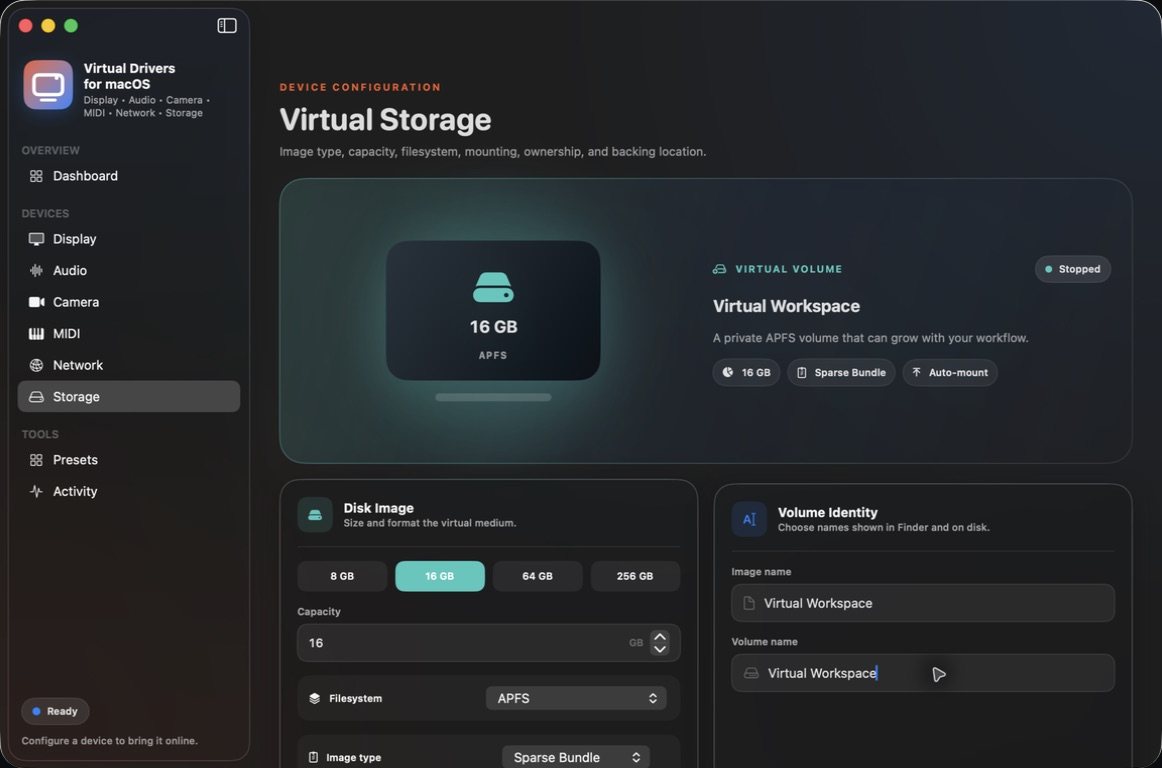
Mountable volumes backed by macOS disk images.

Sparse bundles, sparse or fixed images from 1 GB to 8 TB, in APFS, case-sensitive APFS, Mac OS Extended or ExFAT. No encrypted images yet.

07 · Input & HIDWaiting on Apple
Virtual input devices are gated on Apple's Virtual HID entitlement.

The module needs Apple's approval and a signed helper, and neither is in the current build. Until both land it appears only in the app's small Planned Features strip — no controls, no switch, and no date promised.
Flagship module · Display

A second screen, without the hardware.

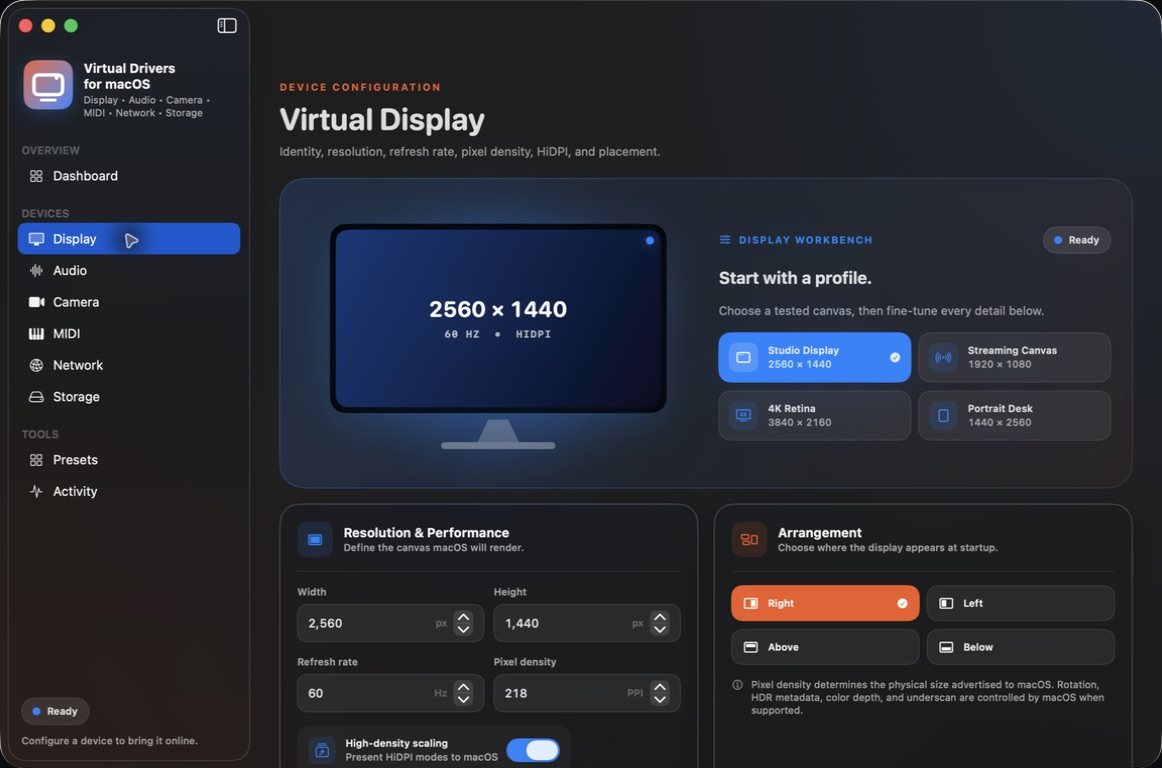
Spawn a display and macOS gives it a display ID like any other screen — arrange it from Displays settings whenever you like. Name it, give it vendor, product and serial identifiers, and set resolution, refresh rate, pixel density, HiDPI scaling and where it sits next to your main screen.

  • Remote and headless work: give screen-sharing software a workspace when no monitor is attached.
  • Streaming and recording: dedicate a clean display to capture or a presentation.
  • UI testing: check apps at different resolutions, aspect ratios and densities.

Presets: Studio Display 2560 × 1440, Streaming Canvas 1920 × 1080, 4K Retina 3840 × 2160 and Portrait Desk 1440 × 2560. The display uses an undocumented CoreGraphics interface, so compatibility can vary by Mac and macOS update, and displays last only while the app is running.

Virtual Display configuration page with a 2560 × 1440, 60 Hz HiDPI preview, four presets, resolution, refresh-rate and pixel-density fields, and placement buttons for right, left, above and below
Display workbench Start from a preset, then fine-tune resolution, refresh, density and placement.

Audio · Mixer & Loopback Matrix

Cables made of samples, and a mixer to wire them.

Install up to eight independent stereo virtual audio cables. Whatever an app plays into a cable's output comes back out of its input, at 44.1 or 48 kHz in 32-bit float.

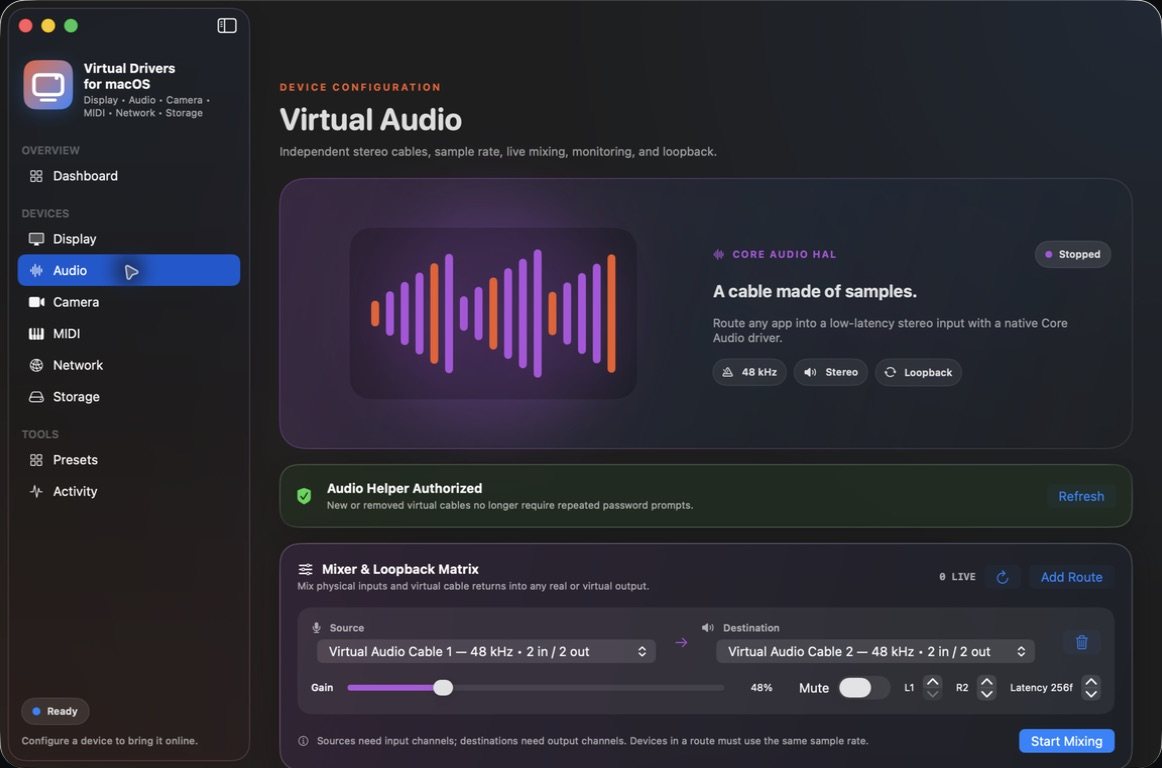
The mixer routes any device with inputs — a physical microphone or a cable's return — into any device with outputs: your speakers, an audio interface or another cable. Routes to the same destination are mixed, each with live gain, mute, left/right channel choice and a sample delay.

  • Stream or podcast mixes: combine a microphone and app audio into a cable your recorder uses as its input.
  • Hear and capture: monitor a cable through speakers while a recorder reads it.
  • Audio QA: send a known signal through a loopback and measure it.

Devices in a route must share a sample rate; there's no resampling or clock-drift compensation, and the mixer doesn't capture individual apps. Setup needs a one-time macOS approval for a helper that can only install or remove the app's own eight audio drivers.

Virtual Audio page showing the Core Audio HAL loopback cable, an authorized audio helper, and a Mixer and Loopback Matrix route from Virtual Audio Cable 1 to Virtual Audio Cable 2 with gain, mute, channel and latency controls
Virtual Audio A route from cable 1 to cable 2, with live gain, mute, channels and latency.

The VirtualDrivers family

The Mac sibling of the Virtual Display Driver.

Virtual Drivers for macOS comes from the developers of the Windows Virtual Display Driver and Virtual Audio Driver, and the Linux Virtual Display Driver. As of September 2026 the Windows driver has more than 10,000 stars on GitHub and more than 745,000 downloads from its GitHub releases.

Same idea — devices that exist only in software. Very different plumbing.

Virtual Display Driver for Windows · Linux Virtual Display Driver

How it plugs inWindows VDD is an indirect display driver (IddCx 1.10). The Mac app drives a private CoreGraphics interface, Core Audio HAL drivers and two system extensions.

Nothing on the Mac needs SIP turned off; macOS asks you to approve each privileged piece.

What it coversWindows VDD adds virtual monitors, with audio as a separate driver. The Mac app puts six device types in one window.

Display, audio, camera, MIDI, network and storage share one dashboard and one activity log.

Display featuresThe Windows driver offers custom EDIDs, HDR and fractional refresh rates. The Mac display sets resolution, refresh, density, HiDPI and placement.

HDR, rotation, color depth and underscan aren't offered by the Mac app in this release.

LifetimeMac virtual displays exist only while the app is running.

Quit the app and they go away. The display's settings are saved, so Spawn Display brings the same canvas back.

Getting itWindows VDD: open source under MIT, from GitHub releases or winget. Mac: coming soon, as a signed and notarized direct download.

Virtual Display Driver on GitHub

Status — honestly

Built, signed and tested. Not out yet.

Build 26.9.6.1 is Developer ID signed, notarized by Apple and stapled. It was installed on PyroSoft's test Mac and each of the six available modules was exercised through the app itself. These are specific results from that Mac, not a compatibility promise.

Working in the current build

  • Two virtual displays ran side by side; one was stopped and replaced while the other kept running.
  • A test signal came back through a cable's loopback and through cable 1 → mixer → cable 2; live mute and gain changed the level without a restart.
  • QuickTime found the Virtual Camera and showed its color bars, with the liveness band changing between frames.
  • A note sent through the virtual MIDI ports came back in MIDI Lab's round-trip test.
  • macOS brought up the isolated network interface with its IPv4 and IPv6 addresses, MTU and route; Stop removed the configuration and routes.
  • A 1 GB APFS sparse bundle was created, mounted, written, read back byte for byte and detached.
  • 34 automated tests pass, and the notarized build passes Gatekeeper.

Not yet

  • No public download. It's coming soon; no date or price has been announced.
  • Virtual Input & HID waits on Apple's entitlement approval and a signed helper.
  • The camera sends generated test video only — no webcam, screen or video-file sources.
  • Network packets are discarded, not forwarded. It isn't a VPN, and macOS limits how many packet tunnels run at once.
  • The audio mixer needs matching sample rates and native float streams; no resampling or drift compensation.
  • MIDI 2.0 and encrypted disk images aren't implemented.
  • Not tested against every Mac, macOS version, DAW, camera app or audio interface.
Latest build26.9.6.1 (build 29) — in testing, not yet available
RequiresmacOS 14 or newer on an Apple Silicon Mac
DistributionDirect download, outside the Mac App Store; Developer ID signed, notarized and stapled
First-run approvalsMove the app to /Applications. Approve the camera and network system extensions in System Settings, and the audio helper once. Microphone access is used only while an audio mix route is active.
Security settingsNo SIP changes or reduced-security mode required

Questions people actually ask

FAQ

When can I get it?

Not yet. Virtual Drivers for macOS is coming soon and there's no public download today. No release date or price has been announced; join the PyroSoft Discord to follow along.

Do I have to turn off System Integrity Protection?

No. No SIP changes or reduced-security mode are required. The camera and network modules are system extensions macOS asks you to approve in System Settings the first time (the app must be in /Applications). If macOS asks for a restart, restart before trying the device again.

Why does audio setup ask for approval?

The audio cables are Core Audio drivers installed system-wide, so setup uses a one-time macOS Service Management approval for a least-privilege helper. That helper can only install or remove the eight signed audio drivers bundled with the app, and it never stores or receives your administrator password. macOS may still ask for administrator approval during setup or updates.

Does a virtual display survive quitting the app?

No. Displays are session-scoped: they exist while the app is running and disappear when it quits. The app saves your display settings, so the same canvas is one Spawn Display away next time.

Is Virtual Network a VPN?

No. It creates an isolated packet interface with its own addresses, DNS, routes and MTU, for testing network-aware software. Packets routed into it are discarded rather than sent to a server, and broad routes or DNS changes can interrupt your normal connection.

Can the virtual camera show my screen, a webcam or a video file?

Not in this release. It publishes generated color bars with a moving band that makes frozen frames easy to spot — useful for checking that an app can find and use a camera. Other live sources aren't part of this build.

Is the virtual display something Apple supports?

No. It relies on private CoreGraphics classes that Apple doesn't document or guarantee, so compatibility can vary by Mac and macOS update. The app is distributed directly, not through the Mac App Store.

Is it open source like the Windows driver?

The Windows Virtual Display Driver is open source under the MIT licence. Virtual Drivers for macOS is a separate app, and its source isn't public.

Coming soon

The Mac build is in testing.

Virtual Drivers for macOS isn't available to download yet. Follow along in the PyroSoft Discord — and if you need a virtual monitor on a Windows PC today, the Virtual Display Driver is ready now.